
Go Live: Publishing Your B2B Store
Once you have verified that your wholesale pricing (Offer Sets) and registration forms are functioning correctly in Test Mode, you are ready to launch your B2B wholesale store to the public.
This guide will walk you through publishing your B2B-enabled theme to make Wi2B active for all storefront visitors.
Step 1: Locate Your Verified Test Theme
First, navigate to your theme library where your draft test theme is stored.
- From your Shopify Admin, go to Online Store.
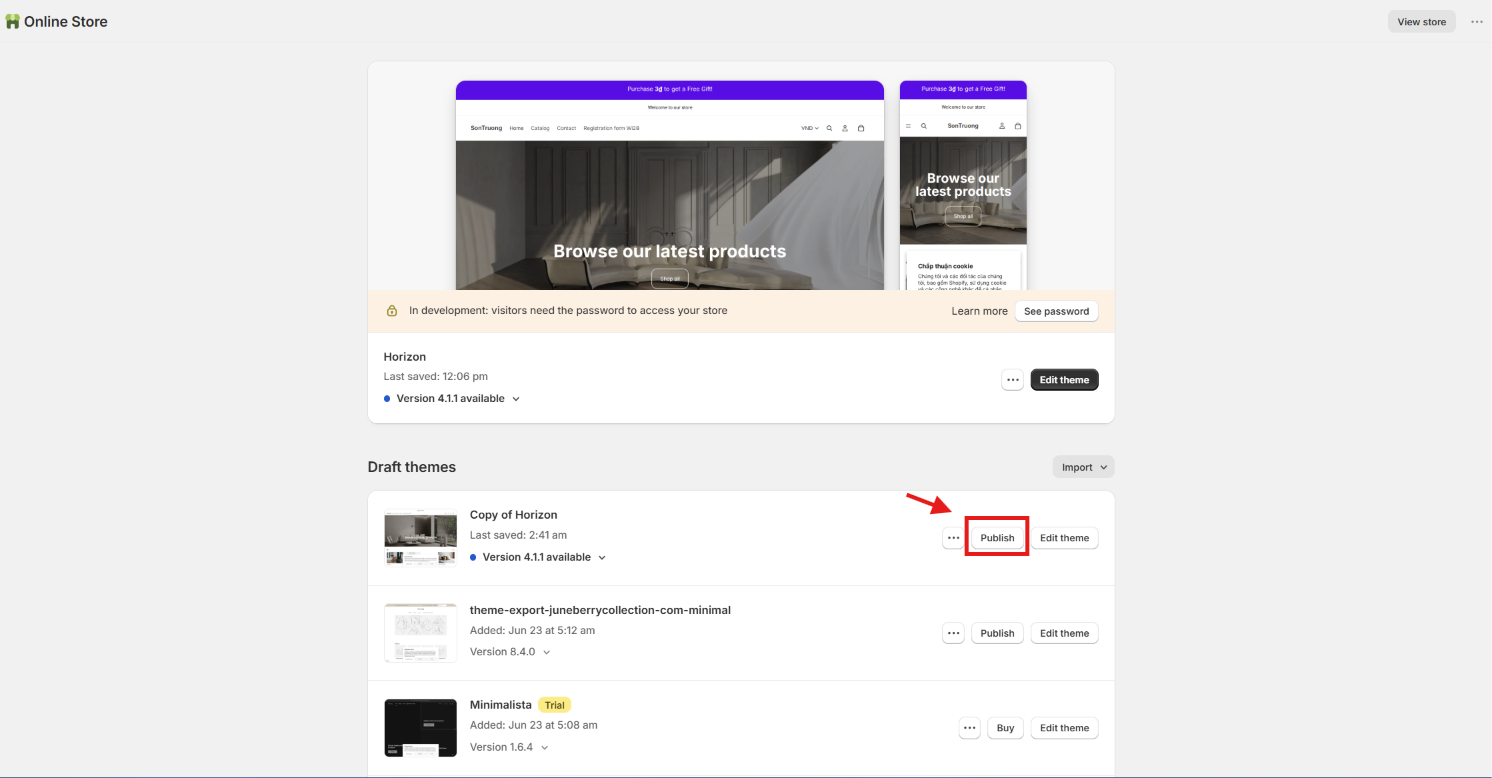
- Scroll down to the Theme library / Draft themes section.
- Locate the duplicated test theme that you configured and verified in the previous steps.
Step 2: Publish the Theme
Publishing this theme will make it the active, live theme on your storefront, replacing your old live theme.
- Click the Publish button next to your verified test theme.
- A confirmation modal will pop up asking: "Are you sure you want to publish...?"
- Click the primary Publish button inside the modal to confirm.
🎉 Congratulations, your B2B store is live!
Your storefront is now fully active with Wi2B features. B2B customers logged in with approved accounts will automatically see their wholesale pricing, and new partners can apply using your registration form.
⚠️ Compatibility Note: To avoid display or checkout conflicts, make sure you do not have other active B2B or wholesale pricing apps enabled on this newly published theme.