
How Offer Set Priority Rules Work
When a product qualifies for multiple wholesale discounts across different Offer Sets, Wi2B automatically applies the rule with the highest discount priority.
The Discount Priority Hierarchy
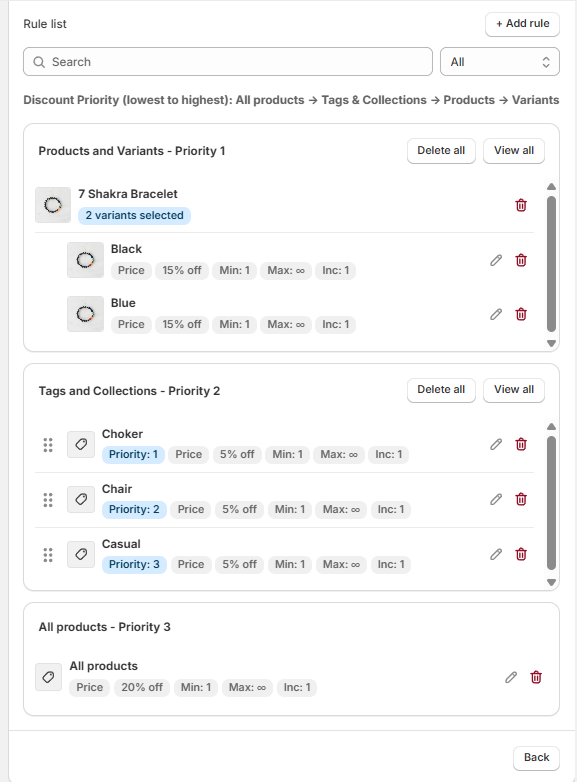
Wi2B ranks pricing rules from highest to lowest priority to ensure the most specific rule is applied:
- Priority 1 (Highest Priority): Products and Variants
- Applies to specific products or variants selected manually.
- Priority 2 (Medium Priority): Tags & Collections
- Applies to products containing specific tags or belonging to selected collections.
- Priority 3 (Lowest Priority): All Products
- Applies to your entire store catalog.
Practical Example
Suppose you have a product named Classic Leather Boots that belongs to the Footwear collection. You configure the following three rules:
- Rule A (Priority 3 - All Products): 10% discount.
- Rule B (Priority 2 - Collection "Footwear"): 15% discount.
- Rule C (Priority 1 - Product "Classic Leather Boots"): 20% discount.
Result: The customer will receive a 20% discount on the Classic Leather Boots because the specific product rule (Priority 1) overrides both the collection rule (Priority 2) and the store-wide rule (Priority 3).
Key Takeaways for Merchants
- Specific rules always override broad rules.
- You do not need to manually disable store-wide discounts (Priority 3) to run a specific promotion on a single product or collection.
Related Guides
To learn how to configure rules and assign products to different priority groups, read:
Need More Help?
If you experience any issues or have questions, please don't hesitate to contact our support team at help@wi2b.com or through our live chat - we're here to assist you!